
Design Configuration#
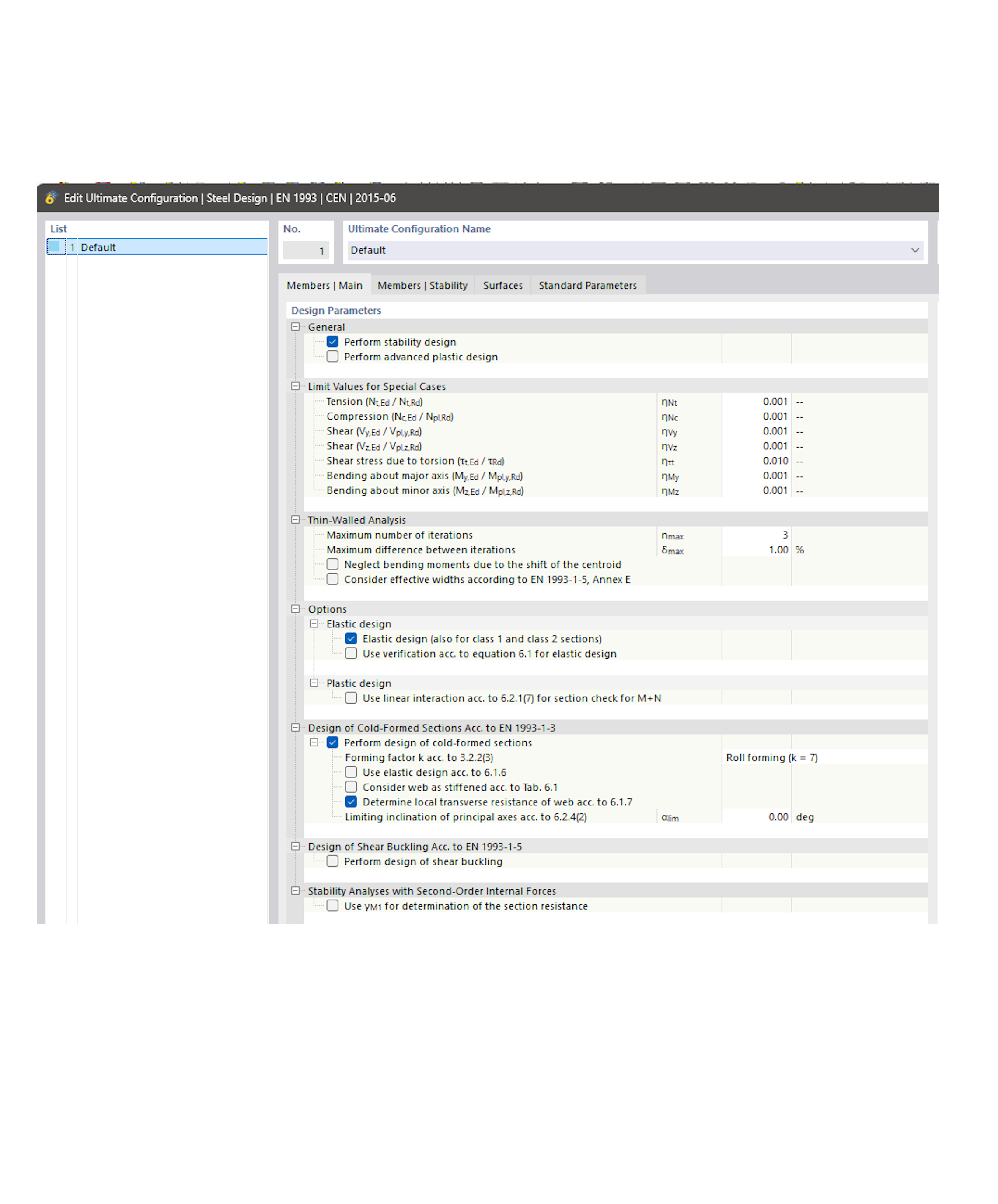
|
In this example we will demonstrate:
|
Note
Whether a setting is written by key or by path follows from the tree, not from preference:
a key that is unique in the tree can be set by key
a key with several occurrences, such as the deflection limit
l_, needs the patha key whose parent occurs more than once, such as
param_k_annex_bunderdefine_parameters_for_lateral_torsional_buckling, cannot be reached by path and has to be set by key
A setting nested under a parent checkbox is only effective once that parent is active as well. Writing the leaf alone stores the value but leaves it without effect, exactly like a greyed-out checkbox in the dialog.
from dlubal.api import rfem, common


# -------------------------------------------------------
# This example demonstrates how to modify a design configuration
# in the model by using helper functions to interact with the
# tree table data structure, either by key or by path.
#
# The settings used here are the ones from the dialog
# "Edit Ultimate Configuration | Steel Design", tab
# "Members | Stability":
#
#   Calculation Method
#     2D - General method (4 degrees of freedom)
#       [x] Extension methods
#           ( ) Interpolation acc. to Eq. 6.66
#           (o) European lateral-torsional buckling curve
#               [x] Adapted method (enable double bending)
#
#   6.3.3(4) Parameters kyy, kyz, kzy, kzz
#     Determine interaction factors for 6.3.3(4) according to
#       ( ) Method 1 acc. to Annex A
#       (o) Method 2 acc. to Annex B
#
# and, from the serviceability configuration, the relative
# deflection limit of a beam.
#
# Which helper to use follows from the tree, not from taste:
#   - a key that is unique in the tree can be set by key
#   - a key with several occurrences needs the path
#   - a key whose PARENT occurs more than once cannot be
#     reached by path and has to be set by key
# All three situations appear below.
# -------------------------------------------------------


def print_tree_table(rows, depth: int = 0) -> None:
    """
    This function prints a tree table recursively, one row per line, with the
    key of the row followed by its value and by the caption that the RFEM
    dialog shows for it.

    It is the quickest way to find the key of a setting: search the printed
    output for the caption you see in the dialog and read off the key next to
    it. Group rows carry no value of their own and print as None.
    """
    for row in rows:
        value = common.get_internal_value(row.value)
        print(f"{'  ' * depth}{row.key} = {value} {row.unit}\t| {row.caption}")
        print_tree_table(row.rows, depth + 1)


# Connect to the RFEM application
with rfem.Application() as rfem_app:

    # --- Initialize the model ---

    # A new model with the Steel Design add-on active already contains the ULS
    # and SLS configuration no. 1, so no configuration is created here.
    rfem_app.close_all_models(save_changes=False)
    rfem_app.create_model(name='steel_design_configurations')

    base_data = rfem_app.get_base_data()
    base_data.addons.steel_design_active = True
    base_data.standards.steel_design_standard = rfem.BaseData.Standards.STEEL_DESIGN_NATIONAL_ANNEX_AND_EDITION_EN_1993_NF_2016_02_STANDARD
    rfem_app.set_base_data(base_data=base_data)


    # --- Get/Set value by key ---

    # Retrieve a design configuration
    steel_uls_config: rfem.steel_design_objects.SteelDesignUlsConfiguration = rfem_app.get_object(
        obj=rfem.steel_design_objects.SteelDesignUlsConfiguration(no=1)
    )

    # Get specific tree table from the configuration
    settings_ec3_uls_tree = steel_uls_config.settings_ec3
    print("\nSTEEL_SETTINGS_EC3_ULS_TREE:")
    print_tree_table(settings_ec3_uls_tree.rows)

    # "Adapted method (enable double bending)" extends the general method acc.
    # to EN 1993-1-1, 6.3.4 to biaxial bending. The checkbox is nested under
    # two parents, and a leaf under an inactive parent is stored but has no
    # effect, exactly like a greyed-out checkbox in the dialog. So the whole
    # branch is written, not the leaf alone.
    double_bending_keys = {
        'extensional_methods': True,                          # Extension methods
        'european_lateral_torsional_buckling_curves': True,   # European lateral-torsional buckling curve
        'interpolation_acc_to_eq_666': False,                 # Interpolation acc. to Eq. 6.66
        'adapted_method': True,                               # Adapted method (enable double bending)
    }

    # Get value/s for the key (there can be multiple occurrences)
    for key in double_bending_keys:
        value = common.tree_table.get_values_by_key(
            tree=settings_ec3_uls_tree,
            key=key
        )
        print(f"{key} (key-based search): {value}")

    # Modify the values from the tree by their keys
    for key, value in double_bending_keys.items():
        common.tree_table.set_values_by_key(
            tree=settings_ec3_uls_tree,
            key=key,
            values=[value]
        )

    # "Method 2 acc. to Annex B" determines the interaction factors kyy, kyz,
    # kzy and kzz acc. to 6.3.3(4). Its own key is unique, but its parent key
    # "define_parameters_for_lateral_torsional_buckling" is shared by two
    # sections of the tree, so a path-based search resolves to the wrong one
    # and returns None. Setting it by key is the reliable way here.
    common.tree_table.set_values_by_key(
        tree=settings_ec3_uls_tree,
        key='param_k_annex_b',
        values=[True]
    )

    # Apply the updated configuration to the model
    rfem_app.update_object(
        obj=rfem.steel_design_objects.SteelDesignUlsConfiguration(
            no=1,
            settings_ec3=settings_ec3_uls_tree
        )
    )

    # Read the settings back to confirm what the model stores. The two radio
    # buttons of a group are mutually exclusive, so "Method 1 acc. to Annex A"
    # is cleared by RFEM itself.
    steel_uls_config = rfem_app.get_object(
        obj=rfem.steel_design_objects.SteelDesignUlsConfiguration(no=1)
    )
    print("\nStability settings after the update:")
    for key in list(double_bending_keys) + ['param_k_annex_a', 'param_k_annex_b']:
        value = common.tree_table.get_values_by_key(
            tree=steel_uls_config.settings_ec3,
            key=key
        )
        print(f"  {key:<44}{value}")


    # --- Get/Set value by path ---

    # Retrieve a design configuration
    steel_sls_config: rfem.steel_design_objects.SteelDesignSlsConfiguration = rfem_app.get_object(
        obj=rfem.steel_design_objects.SteelDesignSlsConfiguration(no=1)
    )

    # Get specific tree table from the configuration
    settings_ec3_sls_tree = steel_sls_config.settings_ec3
    print("\nSTEEL_SETTINGS_EC3_SLS_TREE:")
    print_tree_table(settings_ec3_sls_tree.rows)

    # Get specific value from the tree by its path. The key "l_" is used by
    # every deflection limit of the table, so here the path is what picks out
    # one single value.
    beam_rel_deflection_limit_path=[
        "serviceability_limits",
        "sl_check_limit_characteristic",
        "sl_check_deformation_z_or_resulting_axis_characteristic",
        "l_", # Beam | Relative limit
    ]
    beam_rel_deflection_limit_val = common.get_value_by_path(
        tree=settings_ec3_sls_tree,
        path=beam_rel_deflection_limit_path
    )
    print(f"\nBeam | Relative deflection limit: L/{beam_rel_deflection_limit_val}")

    # Modify the value by path
    common.tree_table.set_value_by_path(
        tree=settings_ec3_sls_tree,
        path=beam_rel_deflection_limit_path,
        value=250
    )

    # Apply the updated configuration to the model
    rfem_app.update_object(
        obj=rfem.steel_design_objects.SteelDesignSlsConfiguration(
            no=1,
            settings_ec3=settings_ec3_sls_tree
        )
    )
using Rfem = Dlubal.Api.Rfem;
using Common = Dlubal.Api.Common;

// -------------------------------------------------------
// This example demonstrates how to modify a design configuration
// in the model by using helper functions to interact with the
// tree table data structure, either by key or by path.
//
// The settings used here are the ones from the dialog
// "Edit Ultimate Configuration | Steel Design", tab
// "Members | Stability":
//
//   Calculation Method
//     2D - General method (4 degrees of freedom)
//       [x] Extension methods
//           ( ) Interpolation acc. to Eq. 6.66
//           (o) European lateral-torsional buckling curve
//               [x] Adapted method (enable double bending)
//
//   6.3.3(4) Parameters kyy, kyz, kzy, kzz
//     Determine interaction factors for 6.3.3(4) according to
//       ( ) Method 1 acc. to Annex A
//       (o) Method 2 acc. to Annex B
//
// and, from the serviceability configuration, the relative
// deflection limit of a beam.
//
// Which helper to use follows from the tree, not from taste:
//   - a key that is unique in the tree can be set by key
//   - a key with several occurrences needs the path
//   - a key whose PARENT occurs more than once cannot be
//     reached by path and has to be set by key
// All three situations appear below.
// -------------------------------------------------------

// Print a tree table recursively, one row per line, with the key of the row
// followed by its value and by the caption that the RFEM dialog shows for it.
//
// It is the quickest way to find the key of a setting: search the printed
// output for the caption you see in the dialog and read off the key next to
// it. Group rows carry no value of their own and print as empty.
//
// The rows are passed as dynamic, because the ULS and the SLS configuration
// each have their own generated row type.
void PrintTreeTable(dynamic rows, int depth = 0)
{
    foreach (var row in rows)
    {
        var value = Common.TreeTable.GetInternalValue(row.Value);
        Console.WriteLine($"{new string(' ', depth * 2)}{row.Key} = {value} {row.Unit}\t| {row.Caption}");
        PrintTreeTable(row.Rows, depth + 1);
    }
}

ApplicationRfem? rfemApp = null;

try
{
    // Connect to the RFEM application
    rfemApp = new ApplicationRfem();

    // --- Initialize the model ---

    // A new model with the Steel Design add-on active already contains the ULS
    // and SLS configuration no. 1, so no configuration is created here.
    rfemApp.close_all_models(saveChanges: false);
    rfemApp.create_model(name: "steel_design_configurations");

    var baseData = rfemApp.get_base_data();
    baseData.Addons.SteelDesignActive = true;
    baseData.Standards.SteelDesignStandard =
        Rfem.BaseData.Types.Standards.Types.SteelDesignStandard.SteelDesignNationalAnnexAndEditionEn1993Nf201602Standard;
    rfemApp.set_base_data(baseData: baseData);

    // --- Get/Set value by key ---

    // Retrieve a design configuration
    Rfem.SteelDesignObjects.SteelDesignUlsConfiguration? steelUlsConfig =
        rfemApp.get_object<Rfem.SteelDesignObjects.SteelDesignUlsConfiguration>(
            new Rfem.SteelDesignObjects.SteelDesignUlsConfiguration { No = 1 }
        );
    // Get specific tree table from the configuration
    var settingsEc3UlsTree = steelUlsConfig.SettingsEc3;
    Console.WriteLine("\nSTEEL_SETTINGS_EC3_ULS_TREE:");
    PrintTreeTable(settingsEc3UlsTree.Rows);

    // "Adapted method (enable double bending)" extends the general method acc.
    // to EN 1993-1-1, 6.3.4 to biaxial bending. The checkbox is nested under
    // two parents, and a leaf under an inactive parent is stored but has no
    // effect, exactly like a greyed-out checkbox in the dialog. So the whole
    // branch is written, not the leaf alone.
    var doubleBendingKeys = new Dictionary<string, object?>
    {
        { "extensional_methods", true },                          // Extension methods
        { "european_lateral_torsional_buckling_curves", true },   // European lateral-torsional buckling curve
        { "interpolation_acc_to_eq_666", false },                 // Interpolation acc. to Eq. 6.66
        { "adapted_method", true },                               // Adapted method (enable double bending)
    };

    // Get value/s for the key (there can be multiple occurrences)
    foreach (var key in doubleBendingKeys.Keys)
    {
        var value = Common.TreeTable.GetValuesByKey(
            tree: settingsEc3UlsTree,
            key: key
        );
        Console.WriteLine($"{key} (key-based search): [{string.Join(", ", value)}]");
    }

    // Modify the values from the tree by their keys
    foreach (var setting in doubleBendingKeys)
    {
        Common.TreeTable.SetValuesByKey(
            tree: settingsEc3UlsTree,
            key: setting.Key,
            values: new List<object?> { setting.Value }
        );
    }

    // "Method 2 acc. to Annex B" determines the interaction factors kyy, kyz,
    // kzy and kzz acc. to 6.3.3(4). Its own key is unique, but its parent key
    // "define_parameters_for_lateral_torsional_buckling" is shared by two
    // sections of the tree, so a path-based search resolves to the wrong one
    // and returns null. Setting it by key is the reliable way here.
    Common.TreeTable.SetValuesByKey(
        tree: settingsEc3UlsTree,
        key: "param_k_annex_b",
        values: new List<object?> { true }
    );

    // Apply the updated configuration to the model
    rfemApp.update_object(
        obj: new Rfem.SteelDesignObjects.SteelDesignUlsConfiguration{
            No= 1,  SettingsEc3= settingsEc3UlsTree
        }
    );

    // Read the settings back to confirm what the model stores. The two radio
    // buttons of a group are mutually exclusive, so "Method 1 acc. to Annex A"
    // is cleared by RFEM itself.
    steelUlsConfig = rfemApp.get_object<Rfem.SteelDesignObjects.SteelDesignUlsConfiguration>(
        new Rfem.SteelDesignObjects.SteelDesignUlsConfiguration { No = 1 }
    );
    Console.WriteLine("\nStability settings after the update:");
    foreach (var key in doubleBendingKeys.Keys.Concat(new[] { "param_k_annex_a", "param_k_annex_b" }))
    {
        var value = Common.TreeTable.GetValuesByKey(
            tree: steelUlsConfig.SettingsEc3,
            key: key
        );
        Console.WriteLine($"  {key,-44}[{string.Join(", ", value)}]");
    }

    // --- Get/Set value by path ---

    // Retrieve a design configuration
    Rfem.SteelDesignObjects.SteelDesignSlsConfiguration? steelSlsConfig =
        rfemApp.get_object<Rfem.SteelDesignObjects.SteelDesignSlsConfiguration>(
            new Rfem.SteelDesignObjects.SteelDesignSlsConfiguration { No = 1 }
        );
    // Get specific tree table from the configuration
    var settingsEc3SlsTree = steelSlsConfig.SettingsEc3;
    Console.WriteLine("\nSTEEL_SETTINGS_EC3_SLS_TREE:");
    PrintTreeTable(settingsEc3SlsTree.Rows);

    // Get specific value from the tree by its path. The key "l_" is used by
    // every deflection limit of the table, so here the path is what picks out
    // one single value.
    var beamRelDeflectionLimitPath = new List<string> {
        "serviceability_limits",
        "sl_check_limit_characteristic",
        "sl_check_deformation_z_or_resulting_axis_characteristic",
        "l_" // Beam | Relative limit
    };
    var beamRelDeflectionLimitVal = Common.TreeTable.GetValueByPath(
        tree: settingsEc3SlsTree,
        path: beamRelDeflectionLimitPath
    );
    Console.WriteLine($"\nBeam | Relative deflection limit: L/{beamRelDeflectionLimitVal}");

    // Modify the value by path
    Common.TreeTable.SetValueByPath(
        tree: settingsEc3SlsTree,
        path: beamRelDeflectionLimitPath,
        value: 250
    );

    // Apply the updated configuration to the model
    rfemApp.update_object(
        obj: new Rfem.SteelDesignObjects.SteelDesignSlsConfiguration{
            No= 1,  SettingsEc3= settingsEc3SlsTree
        }
    );

}
catch (Exception ex)
{
    Console.WriteLine($"Error: {ex.Message}");
}
finally
{
    if (rfemApp != null) rfemApp.close_connection();
}