
Design Configurations#
|
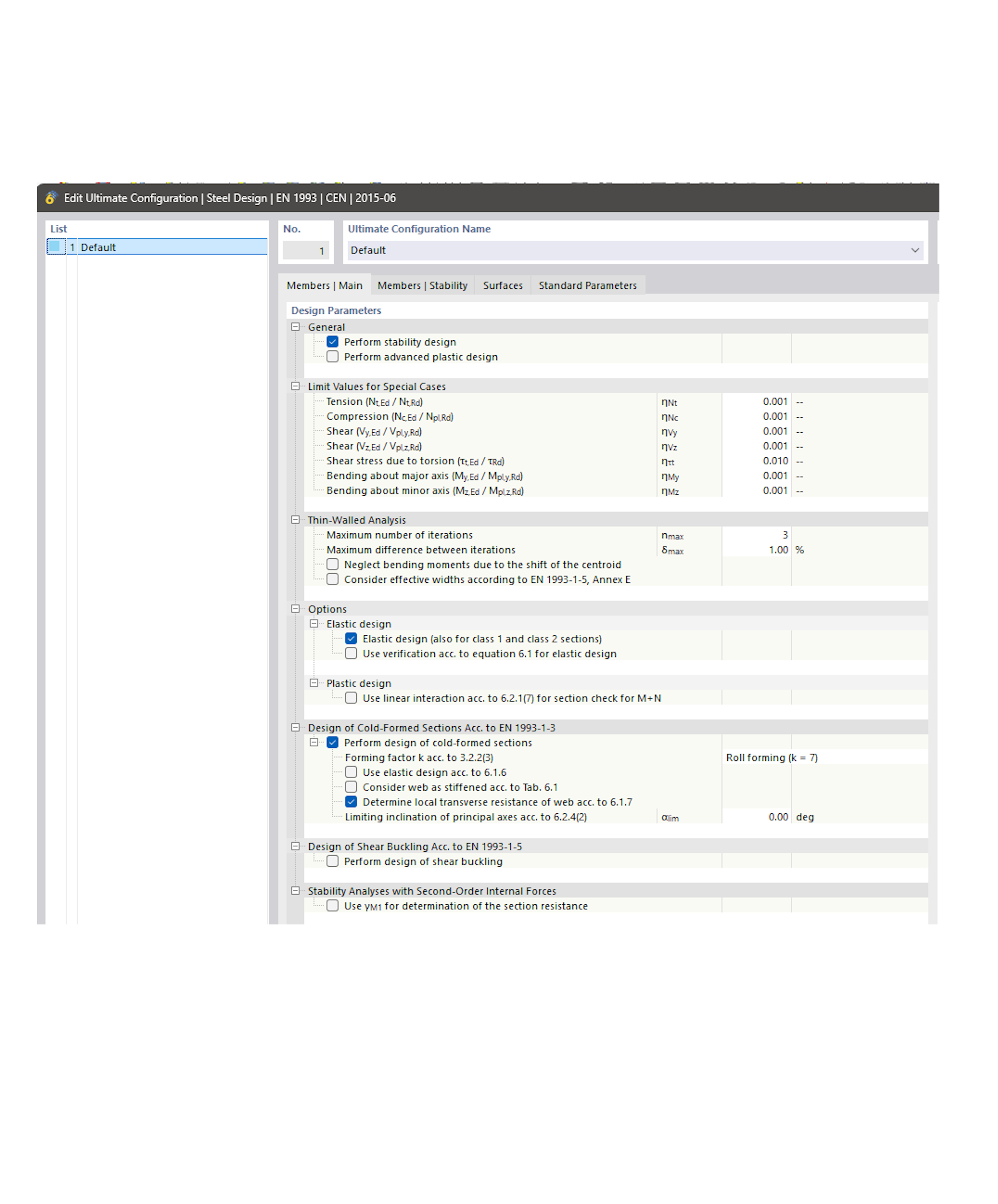
Modifying the ULS and SLS design configuration of a design add-on through its settings tree, shown on the Steel Design add-on:
Keywords:
design configuration ULS configuration SLS configuration tree table set by key set by path return paths partial update design add-on |
Note
Whether a setting is written by key or by path follows from the tree, not from preference:
a key that is unique in the tree can be set by key
a key with several occurrences, such as the deflection limit
l_, needs the patha key whose parent occurs more than once, such as
param_k_annex_bunderdefine_parameters_for_lateral_torsional_buckling, cannot be reached by path and has to be set by key: two top-level sections of the ULS tree share that key, and a path always resolves to the first of them
get_values_by_key(..., return_paths=True) lists every occurrence of a key with its
full path, which is the quickest way from a key to the path to use.
A setting nested under a parent checkbox is only effective once that parent is active as well. Writing the leaf alone stores the value but leaves it without effect, exactly like a greyed-out checkbox in the dialog.
Instead of writing back the whole tree, a tree that contains only the branch of the changed setting can be sent. RFEM merges it into the configuration, and all other settings keep their values. No previous read is needed, so the request is the same every time, which suits generated code, for example by an AI assistant. It requires a path whose keys are unique on each level.
The pattern is the same for every design add-on. Only the configuration object and the name of its settings tree differ, for example for the EN standards:
Configuration object |
Settings tree |
|---|---|
|
|
|
|
|
|
|
|
from dlubal.api import rfem, common
from google.protobuf import json_format


# -------------------------------------------------------
# This example demonstrates how to modify a design configuration
# in the model by using helper functions to interact with the
# tree table data structure, either by key or by path.
#
# The settings used here are the ones from the dialog
# "Edit Ultimate Configuration | Steel Design", tab
# "Members | Stability":
#
#   Calculation Method
#     2D - General method (4 degrees of freedom)
#       [x] Extension methods
#           ( ) Interpolation acc. to Eq. 6.66
#           (o) European lateral-torsional buckling curve
#               [x] Adapted method (enable double bending)
#
#   6.3.3(4) Parameters kyy, kyz, kzy, kzz
#     Determine interaction factors for 6.3.3(4) according to
#       ( ) Method 1 acc. to Annex A
#       (o) Method 2 acc. to Annex B
#
# and, from the serviceability configuration, the relative
# deflection limit of a beam.
#
# Which helper to use follows from the tree, not from taste:
#   - a key that is unique in the tree can be set by key
#   - a key with several occurrences needs the path
#   - a key whose PARENT occurs more than once cannot be
#     reached by path and has to be set by key
# All three situations appear below, followed by how to find the path of a key
# and how to write only the changed branch instead of the whole tree.
#
# The example uses the Steel Design add-on, but the pattern is the same for every
# design add-on: read the configuration object, change its settings tree, write it
# back with update_object. Only the object type and the name of the tree differ,
# for example (EN standards):
#   SteelDesignUlsConfiguration       settings_ec3
#   ConcreteDesignUlsConfiguration    settings_main_ec2, settings_member_ec2,
#                                     settings_surface_ec2, settings_node_ec2
#   TimberDesignUlsConfiguration      settings_ec5
#   AluminumDesignUlsConfiguration    settings_ec9
# -------------------------------------------------------


def print_tree_table(rows, depth: int = 0) -> None:
    """
    This function prints a tree table recursively, one row per line, with the
    key of the row followed by its value and by the caption that the RFEM
    dialog shows for it.

    It is the quickest way to find the key of a setting: search the printed
    output for the caption you see in the dialog and read off the key next to
    it. Group rows carry no value of their own and print as None.
    """
    for row in rows:
        value = common.get_internal_value(row.value)
        print(f"{'  ' * depth}{row.key} = {value} {row.unit}\t| {row.caption}")
        print_tree_table(row.rows, depth + 1)


# Connect to the RFEM application
with rfem.Application() as rfem_app:

    # --- Initialize the model ---

    # A new model with the Steel Design add-on active already contains the ULS
    # and SLS configuration no. 1, so no configuration is created here.
    rfem_app.create_model(name='design_configurations')

    base_data = rfem_app.get_base_data()
    base_data.addons.steel_design_active = True
    base_data.standards.steel_design_standard = rfem.BaseData.Standards.STEEL_DESIGN_NATIONAL_ANNEX_AND_EDITION_EN_1993_NF_2016_02_STANDARD
    rfem_app.set_base_data(base_data=base_data)


    # --- Get/Set value by key ---

    # Retrieve a design configuration
    steel_uls_config: rfem.steel_design_objects.SteelDesignUlsConfiguration = rfem_app.get_object(
        obj=rfem.steel_design_objects.SteelDesignUlsConfiguration(no=1)
    )

    # Get specific tree table from the configuration
    settings_ec3_uls_tree = steel_uls_config.settings_ec3
    print("\nSTEEL_SETTINGS_EC3_ULS_TREE:")
    print_tree_table(settings_ec3_uls_tree.rows)

    # "Adapted method (enable double bending)" extends the general method acc.
    # to EN 1993-1-1, 6.3.4 to biaxial bending. The checkbox is nested under
    # two parents, and a leaf under an inactive parent is stored but has no
    # effect, exactly like a greyed-out checkbox in the dialog. So the whole
    # branch is written, not the leaf alone.
    double_bending_keys = {
        'extensional_methods': True,                          # Extension methods
        'european_lateral_torsional_buckling_curves': True,   # European lateral-torsional buckling curve
        'interpolation_acc_to_eq_666': False,                 # Interpolation acc. to Eq. 6.66
        'adapted_method': True,                               # Adapted method (enable double bending)
    }

    # Get value/s for the key (there can be multiple occurrences)
    for key in double_bending_keys:
        value = common.tree_table.get_values_by_key(
            tree=settings_ec3_uls_tree,
            key=key
        )
        print(f"{key} (key-based search): {value}")

    # Modify the values from the tree by their keys
    for key, value in double_bending_keys.items():
        common.tree_table.set_values_by_key(
            tree=settings_ec3_uls_tree,
            key=key,
            values=[value]
        )

    # "Method 2 acc. to Annex B" determines the interaction factors kyy, kyz,
    # kzy and kzz acc. to 6.3.3(4). Its own key is unique, but its parent key
    # "define_parameters_for_lateral_torsional_buckling" is shared by two
    # sections of the tree, so a path-based search resolves to the wrong one
    # and returns None. Setting it by key is the reliable way here.
    common.tree_table.set_values_by_key(
        tree=settings_ec3_uls_tree,
        key='param_k_annex_b',
        values=[True]
    )

    # Apply the updated configuration to the model
    rfem_app.update_object(
        obj=rfem.steel_design_objects.SteelDesignUlsConfiguration(
            no=1,
            settings_ec3=settings_ec3_uls_tree
        )
    )

    # Read the settings back to confirm what the model stores. The two radio
    # buttons of a group are mutually exclusive, so "Method 1 acc. to Annex A"
    # is cleared by RFEM itself.
    steel_uls_config = rfem_app.get_object(
        obj=rfem.steel_design_objects.SteelDesignUlsConfiguration(no=1)
    )
    print("\nStability settings after the update:")
    for key in list(double_bending_keys) + ['param_k_annex_a', 'param_k_annex_b']:
        value = common.tree_table.get_values_by_key(
            tree=steel_uls_config.settings_ec3,
            key=key
        )
        print(f"  {key:<44}{value}")


    # --- Get/Set value by path ---

    # Retrieve a design configuration
    steel_sls_config: rfem.steel_design_objects.SteelDesignSlsConfiguration = rfem_app.get_object(
        obj=rfem.steel_design_objects.SteelDesignSlsConfiguration(no=1)
    )

    # Get specific tree table from the configuration
    settings_ec3_sls_tree = steel_sls_config.settings_ec3
    print("\nSTEEL_SETTINGS_EC3_SLS_TREE:")
    print_tree_table(settings_ec3_sls_tree.rows)

    # Get specific value from the tree by its path. The key "l_" is used by
    # every deflection limit of the table, so here the path is what picks out
    # one single value.
    beam_rel_deflection_limit_path=[
        "serviceability_limits",
        "sl_check_limit_characteristic",
        "sl_check_deformation_z_or_resulting_axis_characteristic",
        "l_", # Beam | Relative limit
    ]
    beam_rel_deflection_limit_val = common.get_value_by_path(
        tree=settings_ec3_sls_tree,
        path=beam_rel_deflection_limit_path
    )
    print(f"\nBeam | Relative deflection limit: L/{beam_rel_deflection_limit_val}")

    # Modify the value by path
    common.tree_table.set_value_by_path(
        tree=settings_ec3_sls_tree,
        path=beam_rel_deflection_limit_path,
        value=250
    )

    # Apply the updated configuration to the model
    rfem_app.update_object(
        obj=rfem.steel_design_objects.SteelDesignSlsConfiguration(
            no=1,
            settings_ec3=settings_ec3_sls_tree
        )
    )


    # --- Find the path of a setting ---

    # When only the key of a setting is known, for example from the printed
    # tree, return_paths lists every occurrence of the key with its full path.
    # This is the path to use with get/set_value_by_path.
    print("\nAll occurrences of the key 'l_':")
    for path, value in common.tree_table.get_values_by_key(
        tree=settings_ec3_sls_tree,
        key='l_',
        return_paths=True
    ):
        print(f"  {' / '.join(path)} = {value}")


    # --- Write only the changed branch ---

    # Instead of reading, modifying and writing back the whole tree, a tree that
    # contains only the branch of the changed setting can be sent. RFEM merges it
    # into the configuration, all settings that are not part of it keep their
    # values. No previous read is needed, so the request is the same every time,
    # which suits generated code, for example by an AI assistant.
    #
    # The branch is given as a plain dict with the keys of the path and parsed
    # into the tree type of the configuration. It requires a path whose keys
    # are unique on each level: the branch of "Method 2 acc. to Annex B" above
    # cannot be written this way, because its parent key occurs twice at the
    # top level of the ULS tree.
    frequent_deflection_limit_branch = {"rows": [
        {"key": "serviceability_limits", "rows": [
            {"key": "sl_check_limit_frequent", "rows": [
                {"key": "sl_check_deformation_z_or_resulting_axis_frequent", "rows": [
                    {"key": "l_", "value": {"intValue": 250}},  # Beam | Relative limit
                ]},
            ]},
        ]},
    ]}
    rfem_app.update_object(
        obj=rfem.steel_design_objects.SteelDesignSlsConfiguration(
            no=1,
            settings_ec3=json_format.ParseDict(
                frequent_deflection_limit_branch,
                rfem.steel_design_objects.SteelDesignSlsConfiguration.SettingsEc3TreeTable()
            )
        )
    )

    # Read the settings back: the frequent limit changed, the characteristic
    # limit set above by path kept its value
    steel_sls_config = rfem_app.get_object(
        obj=rfem.steel_design_objects.SteelDesignSlsConfiguration(no=1)
    )
    print("\nDeflection limits after the update:")
    for path, value in common.tree_table.get_values_by_key(
        tree=steel_sls_config.settings_ec3,
        key='l_',
        return_paths=True
    ):
        print(f"  {' / '.join(path)} = L/{value}")
using Rfem = Dlubal.Api.Rfem;
using Common = Dlubal.Api.Common;

// -------------------------------------------------------
// This example demonstrates how to modify a design configuration
// in the model by using helper functions to interact with the
// tree table data structure, either by key or by path.
//
// The settings used here are the ones from the dialog
// "Edit Ultimate Configuration | Steel Design", tab
// "Members | Stability":
//
//   Calculation Method
//     2D - General method (4 degrees of freedom)
//       [x] Extension methods
//           ( ) Interpolation acc. to Eq. 6.66
//           (o) European lateral-torsional buckling curve
//               [x] Adapted method (enable double bending)
//
//   6.3.3(4) Parameters kyy, kyz, kzy, kzz
//     Determine interaction factors for 6.3.3(4) according to
//       ( ) Method 1 acc. to Annex A
//       (o) Method 2 acc. to Annex B
//
// and, from the serviceability configuration, the relative
// deflection limit of a beam.
//
// Which helper to use follows from the tree, not from taste:
//   - a key that is unique in the tree can be set by key
//   - a key with several occurrences needs the path
//   - a key whose PARENT occurs more than once cannot be
//     reached by path and has to be set by key
// All three situations appear below.
//
// The example uses the Steel Design add-on, but the pattern is the same for every
// design add-on: read the configuration object, change its settings tree, write it
// back with update_object. Only the object type and the name of the tree differ,
// for example (EN standards):
//   SteelDesignUlsConfiguration       SettingsEc3
//   ConcreteDesignUlsConfiguration    SettingsMainEc2, SettingsMemberEc2,
//                                     SettingsSurfaceEc2, SettingsNodeEc2
//   TimberDesignUlsConfiguration      SettingsEc5
//   AluminumDesignUlsConfiguration    SettingsEc9
// -------------------------------------------------------

// Print a tree table recursively, one row per line, with the key of the row
// followed by its value and by the caption that the RFEM dialog shows for it.
//
// It is the quickest way to find the key of a setting: search the printed
// output for the caption you see in the dialog and read off the key next to
// it. Group rows carry no value of their own and print as empty.
//
// The rows are passed as dynamic, because the ULS and the SLS configuration
// each have their own generated row type.
void PrintTreeTable(dynamic rows, int depth = 0)
{
    foreach (var row in rows)
    {
        var value = Common.TreeTable.GetInternalValue(row.Value);
        Console.WriteLine($"{new string(' ', depth * 2)}{row.Key} = {value} {row.Unit}\t| {row.Caption}");
        PrintTreeTable(row.Rows, depth + 1);
    }
}

ApplicationRfem? rfemApp = null;

try
{
    // Connect to the RFEM application
    rfemApp = new ApplicationRfem();

    // --- Initialize the model ---

    // A new model with the Steel Design add-on active already contains the ULS
    // and SLS configuration no. 1, so no configuration is created here.
    rfemApp.create_model(name: "design_configurations");

    var baseData = rfemApp.get_base_data();
    baseData.Addons.SteelDesignActive = true;
    baseData.Standards.SteelDesignStandard =
        Rfem.BaseData.Types.Standards.Types.SteelDesignStandard.SteelDesignNationalAnnexAndEditionEn1993Nf201602Standard;
    rfemApp.set_base_data(baseData: baseData);

    // --- Get/Set value by key ---

    // Retrieve a design configuration
    Rfem.SteelDesignObjects.SteelDesignUlsConfiguration? steelUlsConfig =
        rfemApp.get_object<Rfem.SteelDesignObjects.SteelDesignUlsConfiguration>(
            new Rfem.SteelDesignObjects.SteelDesignUlsConfiguration { No = 1 }
        );
    // Get specific tree table from the configuration
    var settingsEc3UlsTree = steelUlsConfig.SettingsEc3;
    Console.WriteLine("\nSTEEL_SETTINGS_EC3_ULS_TREE:");
    PrintTreeTable(settingsEc3UlsTree.Rows);

    // "Adapted method (enable double bending)" extends the general method acc.
    // to EN 1993-1-1, 6.3.4 to biaxial bending. The checkbox is nested under
    // two parents, and a leaf under an inactive parent is stored but has no
    // effect, exactly like a greyed-out checkbox in the dialog. So the whole
    // branch is written, not the leaf alone.
    var doubleBendingKeys = new Dictionary<string, object?>
    {
        { "extensional_methods", true },                          // Extension methods
        { "european_lateral_torsional_buckling_curves", true },   // European lateral-torsional buckling curve
        { "interpolation_acc_to_eq_666", false },                 // Interpolation acc. to Eq. 6.66
        { "adapted_method", true },                               // Adapted method (enable double bending)
    };

    // Get value/s for the key (there can be multiple occurrences)
    foreach (var key in doubleBendingKeys.Keys)
    {
        var value = Common.TreeTable.GetValuesByKey(
            tree: settingsEc3UlsTree,
            key: key
        );
        Console.WriteLine($"{key} (key-based search): [{string.Join(", ", value)}]");
    }

    // Modify the values from the tree by their keys
    foreach (var setting in doubleBendingKeys)
    {
        Common.TreeTable.SetValuesByKey(
            tree: settingsEc3UlsTree,
            key: setting.Key,
            values: new List<object?> { setting.Value }
        );
    }

    // "Method 2 acc. to Annex B" determines the interaction factors kyy, kyz,
    // kzy and kzz acc. to 6.3.3(4). Its own key is unique, but its parent key
    // "define_parameters_for_lateral_torsional_buckling" is shared by two
    // sections of the tree, so a path-based search resolves to the wrong one
    // and returns null. Setting it by key is the reliable way here.
    Common.TreeTable.SetValuesByKey(
        tree: settingsEc3UlsTree,
        key: "param_k_annex_b",
        values: new List<object?> { true }
    );

    // Apply the updated configuration to the model
    rfemApp.update_object(
        obj: new Rfem.SteelDesignObjects.SteelDesignUlsConfiguration{
            No= 1,  SettingsEc3= settingsEc3UlsTree
        }
    );

    // Read the settings back to confirm what the model stores. The two radio
    // buttons of a group are mutually exclusive, so "Method 1 acc. to Annex A"
    // is cleared by RFEM itself.
    steelUlsConfig = rfemApp.get_object<Rfem.SteelDesignObjects.SteelDesignUlsConfiguration>(
        new Rfem.SteelDesignObjects.SteelDesignUlsConfiguration { No = 1 }
    );
    Console.WriteLine("\nStability settings after the update:");
    foreach (var key in doubleBendingKeys.Keys.Concat(new[] { "param_k_annex_a", "param_k_annex_b" }))
    {
        var value = Common.TreeTable.GetValuesByKey(
            tree: steelUlsConfig.SettingsEc3,
            key: key
        );
        Console.WriteLine($"  {key,-44}[{string.Join(", ", value)}]");
    }

    // --- Get/Set value by path ---

    // Retrieve a design configuration
    Rfem.SteelDesignObjects.SteelDesignSlsConfiguration? steelSlsConfig =
        rfemApp.get_object<Rfem.SteelDesignObjects.SteelDesignSlsConfiguration>(
            new Rfem.SteelDesignObjects.SteelDesignSlsConfiguration { No = 1 }
        );
    // Get specific tree table from the configuration
    var settingsEc3SlsTree = steelSlsConfig.SettingsEc3;
    Console.WriteLine("\nSTEEL_SETTINGS_EC3_SLS_TREE:");
    PrintTreeTable(settingsEc3SlsTree.Rows);

    // Get specific value from the tree by its path. The key "l_" is used by
    // every deflection limit of the table, so here the path is what picks out
    // one single value.
    var beamRelDeflectionLimitPath = new List<string> {
        "serviceability_limits",
        "sl_check_limit_characteristic",
        "sl_check_deformation_z_or_resulting_axis_characteristic",
        "l_" // Beam | Relative limit
    };
    var beamRelDeflectionLimitVal = Common.TreeTable.GetValueByPath(
        tree: settingsEc3SlsTree,
        path: beamRelDeflectionLimitPath
    );
    Console.WriteLine($"\nBeam | Relative deflection limit: L/{beamRelDeflectionLimitVal}");

    // Modify the value by path
    Common.TreeTable.SetValueByPath(
        tree: settingsEc3SlsTree,
        path: beamRelDeflectionLimitPath,
        value: 250
    );

    // Apply the updated configuration to the model
    rfemApp.update_object(
        obj: new Rfem.SteelDesignObjects.SteelDesignSlsConfiguration{
            No= 1,  SettingsEc3= settingsEc3SlsTree
        }
    );

    // --- Find the path of a setting ---

    // When only the key of a setting is known, for example from the printed
    // tree, returnPaths lists every occurrence of the key with its full path.
    // This is the path to use with Get/SetValueByPath.
    Console.WriteLine("\nAll occurrences of the key 'l_':");
    foreach (Common.TreeTable.TreePathValue? occurrence in Common.TreeTable.GetValuesByKey(
        tree: settingsEc3SlsTree,
        key: "l_",
        returnPaths: true))
    {
        Console.WriteLine($"  {string.Join(" / ", occurrence!.Path)} = {occurrence.Value}");
    }

    // --- Write only the changed branch ---

    // Instead of reading, modifying and writing back the whole tree, a tree that
    // contains only the branch of the changed setting can be sent. RFEM merges it
    // into the configuration, all settings that are not part of it keep their
    // values. No previous read is needed, so the request is the same every time,
    // which suits generated code, for example by an AI assistant.
    //
    // The branch is given as JSON with the keys of the path and parsed into the
    // tree type of the configuration. It requires a path whose keys are unique on
    // each level: the branch of "Method 2 acc. to Annex B" above cannot be written
    // this way, because its parent key occurs twice at the top level of the ULS tree.
    var frequentDeflectionLimitBranch = """
        {"rows": [
          {"key": "serviceability_limits", "rows": [
            {"key": "sl_check_limit_frequent", "rows": [
              {"key": "sl_check_deformation_z_or_resulting_axis_frequent", "rows": [
                {"key": "l_", "value": {"intValue": 250}}
              ]}
            ]}
          ]}
        ]}
        """;
    rfemApp.update_object(
        obj: new Rfem.SteelDesignObjects.SteelDesignSlsConfiguration {
            No = 1,
            SettingsEc3 = Google.Protobuf.JsonParser.Default.Parse<
                Rfem.SteelDesignObjects.SteelDesignSlsConfiguration.Types.SettingsEc3TreeTable>(
                frequentDeflectionLimitBranch
            )
        }
    );

    // Read the settings back: the frequent limit changed, the characteristic
    // limit set above by path kept its value
    steelSlsConfig = rfemApp.get_object<Rfem.SteelDesignObjects.SteelDesignSlsConfiguration>(
        new Rfem.SteelDesignObjects.SteelDesignSlsConfiguration { No = 1 }
    );
    Console.WriteLine("\nDeflection limits after the update:");
    foreach (Common.TreeTable.TreePathValue? occurrence in Common.TreeTable.GetValuesByKey(
        tree: steelSlsConfig!.SettingsEc3,
        key: "l_",
        returnPaths: true))
    {
        Console.WriteLine($"  {string.Join(" / ", occurrence!.Path)} = L/{occurrence.Value}");
    }

}
catch (Exception ex)
{
    Console.WriteLine($"Error: {ex.Message}");
}
finally
{
    if (rfemApp != null) rfemApp.close_connection();
}