
Design Global Settings#
|
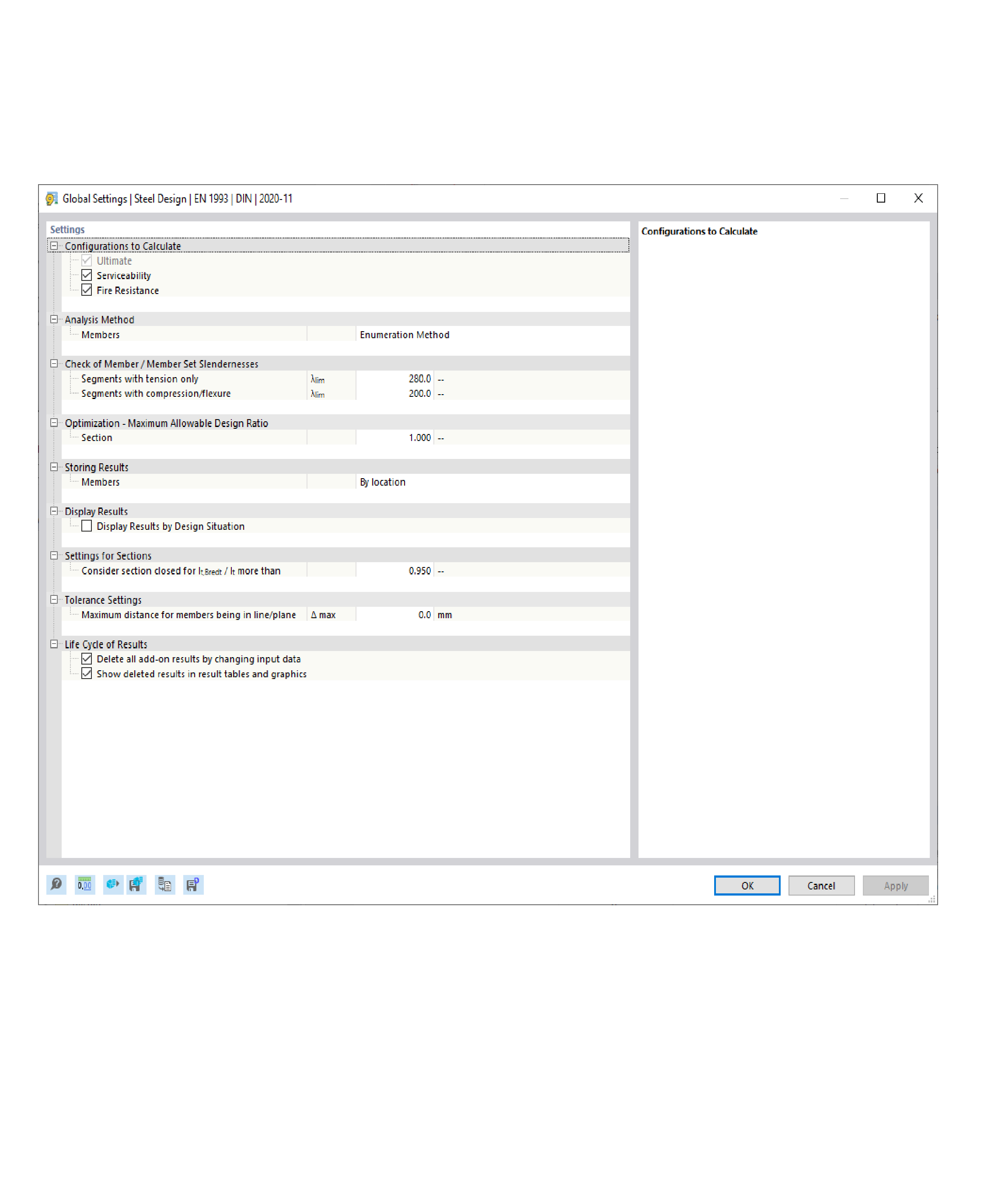
Reading and modifying the global settings of a design add-on, shown on the Steel Design add-on:
Keywords:
global settings design add-on tree table get by key set by key member slenderness |
Note
The same calls work for every design add-on: pass another rfem.DesignAddons value,
for example CONCRETE_DESIGN, TIMBER_DESIGN or ALUMINUM_DESIGN, and use the
keys of its settings tree.
Only the group that was changed is sent back. Settings that are not part of the sent tree keep their values.
from dlubal.api import rfem, common

# -------------------------------------------------------
# This example demonstrates how to modify a design global
# settings in the model by using helper functions to interact
# with the tree table data structure.
#
# The example uses the Steel Design add-on, but the same calls work for every
# design add-on: pass another rfem.DesignAddons value (CONCRETE_DESIGN,
# TIMBER_DESIGN, ALUMINUM_DESIGN, ...) and use the keys of its settings tree.
# -------------------------------------------------------


def print_tree_table(rows, depth: int = 0) -> None:
    """
    Prints a tree table recursively, one row per line, with the key of the row,
    its value and unit. Group rows carry no value of their own and print as None.
    """
    for row in rows:
        value = common.get_internal_value(row.value)
        print(f"{'  ' * depth}{row.key} = {value} {row.unit}")
        print_tree_table(row.rows, depth + 1)


# Connect to the RFEM application
with rfem.Application() as rfem_app:

    # Create a model with the Steel Design add-on active
    rfem_app.create_model(name="design_global_settings")

    base_data = rfem_app.get_base_data()
    base_data.addons.steel_design_active = True
    rfem_app.set_base_data(base_data=base_data)

    # Retrieve a design global settings
    design_settings_tree: rfem.GlobalSettingsTreeTable = rfem_app.get_design_settings(
        addon=rfem.DesignAddons.STEEL_DESIGN
    )
    print("STEEL DESIGN GLOBAL SETTINGS:")
    print_tree_table(design_settings_tree.rows)

    # Get value/s for the key (there can be multiple occurrences)
    member_slenderness_key = 'member_slendernesses_compression_ec3'
    member_slendernesses_val = common.get_values_by_key(
        tree=design_settings_tree,
        key=member_slenderness_key
    )
    print(f"\nMember slendernesses: {member_slendernesses_val}")

    # Modify the value from the tree by the key
    common.set_values_by_key(
        tree=design_settings_tree,
        key=member_slenderness_key,
        values=[150],
    )

    # Apply the updated design settings to the model. Only the group that was
    # changed is sent: settings that are not part of the tree keep their values.
    changed_settings_tree = rfem.GlobalSettingsTreeTable(
        rows=[row for row in design_settings_tree.rows if row.key == 'member_slendernesses']
    )
    rfem_app.set_design_settings(
        addon=rfem.DesignAddons.STEEL_DESIGN,
        global_settings_tree_table=changed_settings_tree
    )

    # Read the settings back to check the new value
    design_settings_tree = rfem_app.get_design_settings(
        addon=rfem.DesignAddons.STEEL_DESIGN
    )
    member_slendernesses_val = common.get_values_by_key(
        tree=design_settings_tree,
        key=member_slenderness_key
    )
    print(f"Member slendernesses after the update: {member_slendernesses_val}")
using Rfem = Dlubal.Api.Rfem;
using Common = Dlubal.Api.Common;

// -------------------------------------------------------
// This example demonstrates how to modify a design global
// settings in the model by using helper functions to interact
// with the tree table data structure.
//
// The example uses the Steel Design add-on, but the same calls work for every
// design add-on: pass another Rfem.DesignAddons value (ConcreteDesign,
// TimberDesign, AluminumDesign, ...) and use the keys of its settings tree.
// -------------------------------------------------------

// Print a tree table recursively, one row per line, with the key of the row,
// its value and unit. Group rows carry no value of their own and print as empty.
void PrintTreeTable(dynamic rows, int depth = 0)
{
    foreach (var row in rows)
    {
        var value = Common.TreeTable.GetInternalValue(row.Value);
        Console.WriteLine($"{new string(' ', depth * 2)}{row.Key} = {value} {row.Unit}");
        PrintTreeTable(row.Rows, depth + 1);
    }
}

ApplicationRfem? rfemApp = null;

try
{
    rfemApp = new ApplicationRfem();

    // Create a model with the Steel Design add-on active
    rfemApp.create_model(name: "design_global_settings");

    var baseData = rfemApp.get_base_data();
    baseData.Addons.SteelDesignActive = true;
    rfemApp.set_base_data(baseData: baseData);

    // Retrieve a design global settings
    Rfem.GlobalSettingsTreeTable? designSettingsTree = rfemApp.get_design_settings(
        addon: Rfem.DesignAddons.SteelDesign
    );
    Console.WriteLine("STEEL DESIGN GLOBAL SETTINGS:");
    PrintTreeTable(designSettingsTree!.Rows);

    // Get value/s for the key (there can be multiple occurrences)
    var memberSlendernessesKey = "member_slendernesses_compression_ec3";
    var memberSlendernessesVal = Common.TreeTable.GetValuesByKey(
        tree: designSettingsTree,
        key: memberSlendernessesKey
    );
    Console.WriteLine($"Member Slenderness: {string.Join(", ", memberSlendernessesVal)}");

    // Modify the value from the tree by the key
    Common.TreeTable.SetValuesByKey(
        tree: designSettingsTree,
        key: memberSlendernessesKey,
        values: new List<object> { 150.0 }
    );

    // Apply the updated design settings to the model. Only the group that was
    // changed is sent: settings that are not part of the tree keep their values.
    var changedSettingsTree = new Rfem.GlobalSettingsTreeTable();
    changedSettingsTree.Rows.AddRange(
        designSettingsTree!.Rows.Where(row => row.Key == "member_slendernesses")
    );
    rfemApp.set_design_settings(
        addon: Rfem.DesignAddons.SteelDesign,
        globalSettingsTreeTable: changedSettingsTree
    );

    // Read the settings back to check the new value
    designSettingsTree = rfemApp.get_design_settings(
        addon: Rfem.DesignAddons.SteelDesign
    );
    memberSlendernessesVal = Common.TreeTable.GetValuesByKey(
        tree: designSettingsTree,
        key: memberSlendernessesKey
    );
    Console.WriteLine($"Member Slenderness after the update: {string.Join(", ", memberSlendernessesVal)}");

}
catch (Exception ex)
{
    Console.WriteLine($"Error: {ex.Message}");
}
finally
{
    if (rfemApp != null) rfemApp.close_connection();
}